Commercial Disclosure Statement: Glide Ebike operates as both a content publisher and retailer of electric bicycles and cycling products. This content contains products sold through our store.
Financial Relationship: We earn revenue from purchases made on products contained within this article. However, products featured have passed our safety and quality evaluation (certifications, materials, design) before commercial consideration.
Editorial Standards: While we endeavor to provide accurate, helpful information drawn from genuine experience with e-bikes and maintenance practices, readers should independently verify information and compare multiple retailers before making purchase decisions.
Table of Contents
E-Bike Display Not Working: Troubleshooting Common Issues
E-Bike Display Not Working: Troubleshooting Common Issues
Few things are more frustrating than pressing the power button on your e-bike and seeing nothing on the display. A blank or malfunctioning display can bring your ride to an immediate halt, leaving you stranded without access to vital information like speed, battery level, or assist settings.
The good news? Most display issues are fixable without a trip to the repair shop. I've encountered countless display problems over the years, from completely dead screens to intermittent flickering, and the vast majority stem from simple connection issues or settings mishaps rather than actual hardware failure.
This comprehensive troubleshooting guide walks you through systematic diagnosis and repair of e-bike display problems. For more preventive maintenance strategies, check out our E-Bike Maintenance Checklist to keep all your e-bike systems running smoothly.
Key Takeaways
Bottom Line Up Front: Most e-bike display problems result from loose connections, incorrect settings, or low battery voltage. Start with the simplest solutions—checking connections and battery charge—before moving to more complex diagnostics. Regular connector cleaning and firmware updates prevent 80% of display issues.
Understanding Your E-Bike Display System
Before diving into troubleshooting, understanding how your display connects to the e-bike system helps identify where problems originate. Your display is the central interface between you and the e-bike's electronic components.
E-bike displays typically connect through a communication cable (usually 5-pin or waterproof connectors) that carries both power and data. The display communicates with the controller, which manages motor output based on your input through the display buttons or external controls. For a deeper understanding of how electrical systems interconnect, see our guide on E-Bike Electrical Connection Issues.
Common Display Types
Different display technologies present unique troubleshooting challenges. LCD displays are most common and relatively simple, while advanced color TFT displays with Bluetooth connectivity introduce additional complexity.
LCD Displays
Basic monochrome screens showing essential data. Most reliable type with fewest components to fail. Common brands include Bafang, KT, and generic Chinese manufacturers.
LED Displays
Simple indicator lights showing battery level and assist mode. Very robust but limited information. Popular on budget e-bikes and cargo models.
TFT Color Displays
Advanced full-color screens with GPS, Bluetooth, and smartphone integration. More features mean more potential failure points. Found on premium models.
Quick Diagnostic Flowchart
When your display fails, systematic troubleshooting saves time and prevents unnecessary parts replacement. Follow this diagnostic sequence to quickly identify the problem source.
Display Not Working? Start Here
Step 1: Power Check
Is your battery charged and properly seated? Check battery indicator lights. If battery shows charge but display is dead, proceed to next step. If battery is completely dead, charge it first. Battery voltage issues are a common cause—learn more in our E-Bike Battery Care guide.
Step 2: Connection Inspection
Disconnect and reconnect display cable at both ends. Look for bent pins, corrosion, or moisture in connector. Clean with isopropyl alcohol if needed. Test display after reconnection.
Step 3: Display Reset
Hold down power button for 10-15 seconds to force reset. Some displays require specific button combinations (check manufacturer manual). Wait 30 seconds before powering on again.
Step 4: Cable Continuity Test
With multimeter, test for continuity through display cable. If cable shows no continuity, it's damaged internally and needs replacement. Check cable routing for pinch points.
Step 5: Voltage Verification
Measure voltage at display connector (should match battery voltage minus small drop). If voltage is present but display doesn't work, display unit itself has failed and requires replacement.
Pro Tip from the Field
Last winter, three customers came in with identical "dead display" complaints. All three turned out to be extreme cold causing temporary LCD failure. Bringing the bikes indoors for 30 minutes restored display function. Always consider environmental factors before assuming hardware failure.
Common Display Problems and Solutions
Different symptoms point to different underlying issues. Here's a comprehensive breakdown of what each symptom typically indicates and how to fix it.
Symptom-Based Diagnosis
Display Completely Blank
Most Likely Cause: Lost power connection or dead battery
Fix: Verify battery charge level first. Check connector at display base—loose connections account for 60% of blank displays. Inspect cable for damage along entire length, especially where it passes through frame routing holes.
Advanced Check: Measure voltage at display connector with multimeter. Should read within 1-2V of battery voltage (e.g., 36V battery = 34-36V at connector).
Display Powers On But Shows Error Code
Most Likely Cause: Communication failure between display and controller
Fix: Common error codes: E001/E002 = communication error, E007 = motor sensor issue, E008 = controller problem. Disconnect main controller connector, inspect for corrosion, clean with contact cleaner, reconnect firmly. If error persists, check controller connection to motor. For motor-specific issues, consult our E-Bike Motor Noise guide.
Intermittent Display Function
Most Likely Cause: Loose connection or damaged cable
Fix: Wiggle display cable while watching screen. If display flickers during cable movement, you've found a damaged section. Check connector terminals for bent or recessed pins. Apply electrical contact cleaner and ensure full insertion. If problem persists, replace cable assembly.
Display Dims or Fades
Most Likely Cause: LCD backlight failure or voltage drop
Fix: Check battery voltage under load. If battery voltage sags below 30V on a 36V system during use, battery cells are weak. LCD backlights fail gradually—if display is visible but very dim even at max brightness setting, backlight is dying and display needs replacement.
Buttons Not Responding
Most Likely Cause: Water ingress or membrane failure
Fix: Remove display from mount. Inspect rubber button membranes for cracks or tears. Moisture under button membrane shorts contacts. Open display case (if possible), dry thoroughly with compressed air, reassemble with silicone sealant around seams. If buttons still fail, replace display unit.
Display Shows Wrong Information
Most Likely Cause: Settings mismatch or sensor calibration issue
Fix: Access display settings menu (usually hold MODE + UP buttons for 5 seconds). Verify wheel circumference setting matches your actual wheel size. Incorrect setting causes speed/distance errors. Reset to factory defaults if readings are completely wrong, then re-enter correct parameters.
Essential Tools and Replacement Parts
Having the right tools makes diagnosis faster and prevents damage during troubleshooting. Here's what you need for most display repairs.
Required Tools for Display Troubleshooting
Digital Multimeter: Essential for voltage and continuity testing. Set to 20V DC range for battery voltage checks.
Small Screwdriver Set: Phillips and flathead for opening display housings and accessing connector screws.
Isopropyl Alcohol (90%+): For cleaning electrical contacts and removing corrosion from pins.
Contact Cleaner Spray: Specifically for electrical connections, evaporates quickly without residue.
Dielectric Grease: Apply to connectors after cleaning to prevent future corrosion from moisture exposure.
Needle-Nose Pliers: For straightening bent connector pins without breaking them.
Headlamp or Work Light: Connector inspection requires good lighting, especially inside frame cable ports.
Step-by-Step Connection Troubleshooting
Connection problems cause 70% of display failures. Here's the detailed process for checking and cleaning connections properly.
Display Cable Connector Inspection
Start at the display end where connectors are most exposed to weather and vibration. Remove the display from its mounting bracket to access the base connector.
Inspection Process:
Examine the connector housing for cracks that allow water entry. Even small cracks can let moisture seep in during rain or bike washing. Check the rubber O-ring seal around the connector—if it's hardened or missing, replace it before reconnecting.
Look closely at the pins inside the connector. They should be straight, uniform in length, and show bright metal color. If pins are recessed, bent, or show green corrosion, they need attention.
⚠️ Warning: Don't Force Connections
Forcing misaligned connectors damages pins permanently. Always align connector keys (the shaped plastic guides) before applying pressure. If resistance is felt, pull apart and try again with proper alignment.
Cleaning Corroded Connectors
Corrosion appears as green, white, or black deposits on pins. This insulating layer breaks electrical contact even when connector appears secure.
Cleaning Method: Spray connector with contact cleaner while holding it vertically with pins facing down. Agitate with a small brush (old toothbrush works). Blast out residue with compressed air. For heavy corrosion, gently scrape pins with a wooden toothpick—never use metal which scratches the plating.
After cleaning, apply a tiny amount of dielectric grease to the pins. This prevents future corrosion without interfering with electrical contact. Reconnect firmly and check for proper seating.
Testing and Replacing Display Units
When basic troubleshooting doesn't solve the problem, systematic testing determines whether the display unit itself has failed.
Voltage Testing at Display Connector
Set your multimeter to 20V DC. Turn battery on but leave display disconnected. Probe the connector pins—red probe to positive (usually red wire), black probe to negative (usually black wire). You should read voltage matching your battery nominal voltage (36V, 48V, 52V, etc.).
If voltage is present at the connector but display won't power on, the display unit has an internal failure. Common causes include water damage to the circuit board, failed voltage regulator, or LCD panel failure.
Compatible Replacement Displays
When replacement is necessary, choosing a compatible display ensures proper communication with your existing controller. Here are quality replacement options from our catalog.
Compatibility: Most Chinese controllers with UART protocol
This LCD display replaces most standard e-bike displays using the common 5-pin UART connection protocol. The 860C model offers a larger screen ideal for riders who want easier readability. Backlit display remains visible in all lighting conditions. Waterproof rating IP54 protects against rain and splashes.
Strengths:
Plug-and-play replacement for most systems
Clear backlit LCD readable in sunlight
Error code display aids troubleshooting
Compact 600C or larger 860C options
Settings adjustable for different wheel sizes
Limitations:
Not compatible with CANbus systems (Bosch, Shimano)
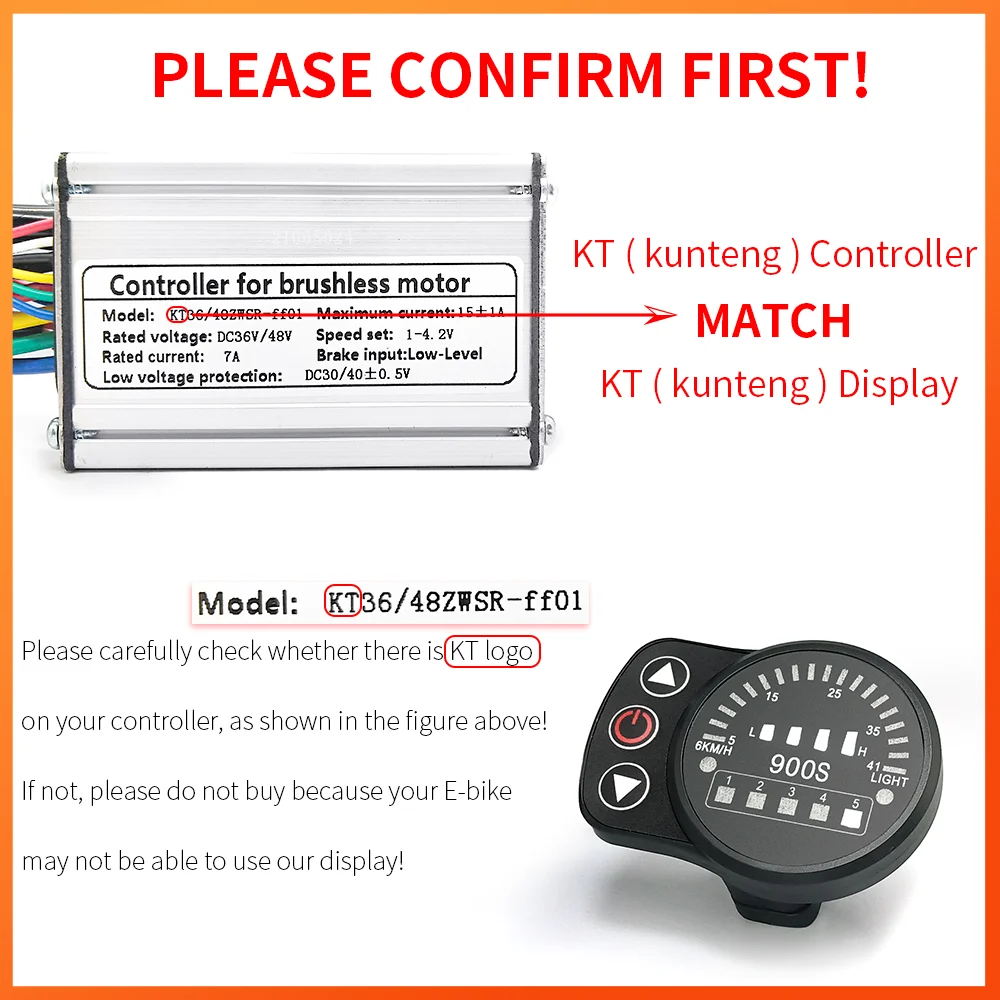
The KT LED900S offers reliable simplicity with LED indicators instead of an LCD screen. Fewer components mean higher reliability and weather resistance. Perfect for riders who value durability over advanced features. The bright LEDs are easily visible even in direct sunlight.
The S810 offers advanced data tracking uncommon in this price range. Real-time amp-hour monitoring helps predict remaining range accurately. Wide voltage compatibility (up to 60V) makes it suitable for high-power systems. The larger 2.8" screen displays more information simultaneously.
Features: Full color display, USB charging port, configurable parameters, firmware upgradeable
Screen: 3.5" TFT color display
The 850C represents Bafang's premium display option with full-color graphics and advanced configuration capabilities. USB charging port powers phones or GPS units. Deep parameter settings allow fine-tuning motor response, assist levels, and speed limits. Compatible exclusively with Bafang mid-drive systems (BBS01B, BBS02B, BBSHD, M500, M600).
Regular maintenance prevents most display failures. Simple habits protect your display from the environmental factors that cause problems.
Display Maintenance Schedule
Weekly (for Regular Riders)
Wipe display screen with microfiber cloth to remove dust and fingerprints. Quick visual inspection of connector for looseness or visible damage. Check mounting bracket tightness—vibration loosens mounts over time.
Monthly
Remove display from mount and inspect base connector closely. Clean any dust or debris from connector area. Check cable routing along frame—ensure no pinch points where cable passes through frame openings. Test button responsiveness—sticky buttons indicate water ingress.
Every 3 Months
Disconnect main display cable at controller end. Clean both connector ends with contact cleaner. Apply fresh dielectric grease to pins. Inspect entire cable length for abrasion or cuts in outer insulation. Check firmware version and update if newer version available—see our E-Bike Firmware Updates guide for proper procedures.
Seasonally (Storage Preparation)
If storing bike for extended period, disconnect display completely and store indoors. Battery discharge during storage can cause voltage sag that damages display electronics. Clean all connections thoroughly before storage. Consider removing battery as well for separate indoor storage.
Weather Protection Strategies
Environmental exposure causes gradual display degradation. Protecting your display from weather extends its lifespan significantly.
Heavy rain is less damaging than repeated light moisture exposure. Light rain and fog allow water to seep into connectors through capillary action, while heavy rain simply sheets off if connectors are properly sealed.
After riding in wet conditions, tilt the bike to drain water from connectors. Display connectors typically face downward but water can pool around the base. A quick burst of compressed air through the connector area removes trapped moisture before it causes corrosion.
Extreme cold makes LCD displays sluggish or temporarily non-functional. This is normal behavior—LCD fluid responds slowly below 0°C (32°F). Bringing the display to room temperature restores function. If you regularly ride in extreme cold, consider an LED display instead which isn't temperature-affected.
When to Replace vs. Repair
Understanding whether repair or replacement makes sense saves money and frustration. Some problems are economically unrepairable.
Problem
Repair Recommended
Replace Recommended
Loose connection
✓ Clean and reseat connector (5 minutes)
Corroded pins
✓ Clean with contact cleaner and dielectric grease (10 minutes)
Damaged cable
✓ If damage is near connector, can shorten cable
✓ If mid-cable damage, replacement cable needed
Cracked housing
✓ Small cracks sealable with epoxy
✓ Large cracks allow water entry, replace unit
Failed backlight
✓ Backlight replacement requires display disassembly, not economical
✓ Circuit board corrosion is irreversible, replace display
Wrong readings
✓ Recalibrate wheel size and voltage settings first
✓ If calibration fails, display sensor fault, replace
Cost-Benefit Analysis
Basic LCD displays cost $20-40 for replacement. Spending more than 30 minutes troubleshooting becomes economically questionable unless you enjoy the diagnostic process. Premium color displays ($80-150) justify more extensive repair attempts.
Controller compatibility is the key factor. If your display is proprietary to your e-bike brand (Bosch, Shimano, Specialized), replacement from third-party sources isn't possible. In these cases, authorized dealer repair is your only option—expect $100-200 including labor.
Advanced Troubleshooting: Firmware and Settings
Modern displays contain updatable firmware that can cause issues if corrupted or incompatible with your controller version.
Firmware Version Checking
Most displays show firmware version in settings menu. Access varies by brand—common method is holding MODE button while powering on. If display shows "SW V1.2" or similar, that's your software version.
Firmware updates fix bugs and add features but can introduce new problems if applied incorrectly. Before updating firmware, record all your custom settings (wheel size, speed limit, assist levels) as updates typically reset to factory defaults.
Parameter Reset Procedures
When display behaves erratically—random error codes, incorrect assist levels, or strange button behavior—a full parameter reset often resolves software glitches.
Universal Reset Method: Remove battery completely. Press and hold display power button for 30 seconds to discharge capacitors. Wait 2 minutes. Reconnect battery and power on display. This forces a cold boot that clears temporary software errors.
For deep resets that restore factory defaults, consult your specific display manual—the process varies significantly between manufacturers. Most involve holding specific button combinations during power-up.
Tools and Spare Parts Worth Having
Keeping common replacement parts on hand prevents ride-stopping failures. Here are the most useful spares and tools for display maintenance.
This comprehensive toolkit covers every adjustment and repair you'll encounter with e-bike maintenance. The hex key set handles display mounting brackets, while precision screwdrivers open display housings. Quality tools prevent stripped fasteners and damaged components.
Strengths:
Complete tool selection for all repairs
Quality steel construction lasts years
Organized case keeps tools accessible
Compact size fits under seat or in bag
Limitations:
Doesn't include electrical testing tools
Some tools may be redundant if you have home tools
Includes: Syringes, adapters, bleed blocks, mineral oil, DOT fluid
Case: Professional carrying case with labeled compartments
While primarily for brake maintenance, this kit's syringes and tubing are invaluable for applying precise amounts of contact cleaner to display connectors without overspray. The flexible tubing reaches tight connector locations that aerosol sprays can't access effectively.
Theory helps, but real examples show how problems actually present and get solved. Here are three situations I've encountered recently.
Case Study 1: The Intermittent Display
A rider brought in a fat-tire e-bike with a display that worked perfectly at home but died after 10 minutes of riding, then mysteriously came back to life later. Wiggling wires showed no effect, battery was fully charged, and no error codes appeared when display worked.
The solution turned out to be thermal expansion. The display cable passed through a frame grommet that compressed the cable when frame temperature increased during riding. As the aluminum frame heated from motor operation and sun exposure, it expanded slightly, pinching the cable inside the routing hole.
Fix: Rerouted cable through a larger grommet with more clearance. Problem never returned. This demonstrates why systematic diagnosis beats parts replacement—replacing the display wouldn't have solved a cable routing problem.
Case Study 2: The Completely Dead Display
Display appeared completely dead—no lights, no response to buttons, nothing. Battery showed full charge, and motor worked when throttle was used. Display connector looked clean and properly seated.
Voltage testing revealed the problem: 36V at battery, but 0V at display connector. The main power cable had been damaged inside the frame where it rubbed against a sharp aluminum burr from drilling. The outer insulation looked perfect, but the copper conductors were severed inside.
Fix: Replaced main power cable and filed down the sharp burr that caused the damage. Protected cable run with foam tubing. This case shows why voltage testing at multiple points is essential—visual inspection alone couldn't find this hidden damage.
Case Study 3: The Ghost in the Machine
Display showed random error codes and assist level changes without button presses. Sometimes it powered on by itself when battery was connected, sometimes it wouldn't power on at all. Behavior was completely unpredictable.
Investigation revealed moisture inside the controller housing (not the display). Water had entered through a cracked wire grommet during pressure washing. The moisture caused random shorts on the controller's circuit board, sending garbage data to the display.
Fix: Dried controller thoroughly with compressed air and heat gun (low setting). Sealed the cracked grommet with silicone. Replaced the controller's internal fuse which had partially failed. The display was never the problem—it was just faithfully displaying errors from the controller.
These cases emphasize a crucial point: don't assume the display is faulty just because it shows problems. Often the display is working perfectly but reporting issues from elsewhere in the system. If you're experiencing assist system issues alongside display problems, see our guides on Pedal Assist Not Working and Throttle Problems.
Display Troubleshooting for Different E-Bike Brands
Brand-specific systems have unique quirks worth knowing. Proprietary systems limit repair options but follow predictable patterns.
Bafang Systems
Bafang mid-drives (BBS series, M500, M600) use either the simple DPC-14 display or advanced 850C/750C color displays. These communicate via 4-pin Higo connector with proprietary protocol.
Common Bafang display issue: Error Code 30 indicates communication failure between display and motor. This almost always stems from damaged motor cable rather than display fault. Check the main motor cable where it exits the motor housing—vibration causes wear at this flex point.
The DPC-14 display uses simple up/down/power buttons. If buttons stop working, the membrane has failed—these displays aren't economically repairable and need replacement. The 850C uses mechanical buttons that can be cleaned and usually recover function.
Generic Chinese Controllers
Most affordable e-bikes use generic Chinese controllers and displays (KT, Kunteng, S series). These typically use UART communication protocol through 5-pin waterproof connectors.
The upside: displays are interchangeable—any UART display works with any UART controller. The downside: inconsistent wire color coding between manufacturers means you can't rely on wire colors matching.
When replacing generic displays, test fit the connector before buying. There are 5-pin SM connectors, 5-pin waterproof connectors, and 5-pin Higo connectors—all different and incompatible despite having the same pin count.
Proprietary Systems (Bosch, Shimano, Brose)
Premium e-bikes with integrated drive systems use CANbus communication between components. Displays, motors, and batteries all authenticate with each other—you can't mix and match components.
For Bosch systems, the Intuvia, Nyon, and Kiox displays all require dealer-level diagnostic software to troubleshoot. Error codes must be looked up in Bosch's service documentation. Display replacement requires pairing with the system—this isn't DIY-friendly.
Shimano STEPS systems similarly require dealer tools for diagnostics. The SC-E6100 and SC-E8000 displays are sealed units that can't be repaired—if they fail, replacement is the only option.
If you own a premium system and experience display problems, attempting DIY repair risks voiding warranty. Contact an authorized dealer first unless your warranty has expired.
📥 Download Your Free Display Troubleshooting Checklist
Get our comprehensive PDF guide with step-by-step diagnostic flowcharts, common error code meanings, and printable voltage testing charts. Keep this reference with your tools for quick problem-solving on the trail or at home.
Includes: Complete diagnostic flowchart, error code reference table, maintenance schedule template, and connector cleaning guide with photos
Frequently Overlooked Causes
After systematic troubleshooting, if problems persist, consider these less obvious causes that account for the remaining "mysterious" failures.
Voltage Sag Under Load
Displays work fine when stationary but shut off under heavy acceleration. Battery shows adequate charge on the indicator. The problem is voltage sag—battery cells can't deliver current fast enough, voltage drops below display's minimum threshold.
This indicates failing battery cells. Test by measuring voltage at display connector while applying heavy throttle. If voltage drops below 30V on a 36V system or below 40V on a 48V system, battery needs service or replacement.
Electromagnetic Interference
Display shows random errors or resets only when motor is running at high power. Controller generates electromagnetic interference that couples into display cable, appearing as data corruption.
Solution: Route display cable away from motor phase wires. Add ferrite cores (snap-on EMI suppressors) to both ends of display cable. These absorb interference before it affects data transmission.
Ground Connection Issues
Loose ground connections cause bizarre electrical behavior. Display powers on but shows random behavior, possibly accompanied by other electrical glitches like flickering lights or motor cutouts.
Check that all ground wires (black wires) have solid connections at battery negative terminal and controller ground point. Paint or anodizing on frame mounting points insulates the connection—scrape to bare metal before mounting ground lugs.
Related Maintenance Resources
Display health connects to overall e-bike electrical system maintenance. For comprehensive care of your e-bike's electronic components, explore these related guides:
Learn proper E-Bike Battery Care techniques that prevent voltage-related display problems. Understanding battery maintenance helps you identify when display issues actually stem from power supply problems.
If you're experiencing motor cutouts along with display problems, check our guide on E-Bike Derailleur Adjustment as sensor misalignment can trigger protective error codes on your display.
For riders dealing with winter storage, our E-Bike Winter Storage guide covers proper electrical system protection that prevents display failures after seasonal storage.
Browse our full selection of E-Bike Spare Parts for replacement displays, cables, and connectors compatible with most e-bike systems.
⚠️ Important Disclaimer
Disclaimer: This guide provides general information about electric bike display troubleshooting and is not intended as a substitute for professional electrical or mechanical service. Working with e-bike electrical systems involves potential risks including electric shock, short circuits, and fire hazards if proper safety precautions aren't followed. Always disconnect the battery before working on electrical connections. Some warranty coverage may be voided by owner repairs—check your warranty terms before attempting fixes. For complex electrical problems, unknown error codes, or proprietary systems (Bosch, Shimano, Specialized, etc.), consult qualified professionals. Improper troubleshooting can damage expensive components. Use proper safety equipment including insulated tools and eye protection. Never bypass safety features or modify electrical systems beyond manufacturer specifications.
Conclusion: Methodical Diagnosis Beats Guesswork
Most display problems have simple solutions when approached methodically. Start with the obvious—connections and power—before assuming component failure.
Remember that displays rarely fail spontaneously. Something changed to cause the problem: a connection worked loose from vibration, moisture entered a connector, cable insulation wore through, or a software setting was accidentally changed. Identifying what changed leads you to the solution faster than random parts replacement.
Keep your display clean and dry, maintain proper cable routing, and inspect connections regularly. These simple habits prevent 90% of display failures and keep you riding instead of troubleshooting.
Your display is your e-bike's communication center. Understanding how to diagnose and fix its problems empowers you to handle most issues independently, saving time and money while building valuable repair skills.
Val is an e-bike specialist with over 10 years of experience riding, maintaining, and testing electric bicycles. At Glide Ebike, Val creates maintenance guides and content based on a decade of hands-on work with e-bike systems, having personally serviced and ridden dozens of different models.
With over 25,000 miles logged across various terrains and conditions, Val's recommendations come from real-world experience with what works—and what doesn't—in everyday e-bike ownership.