Commercial Disclosure Statement: Glide Ebike operates as both a content publisher and retailer of electric bicycles and cycling products. This content contains products sold through our store.
Financial Relationship: We earn revenue from purchases made on products contained within this article. However, products featured have passed our safety and quality evaluation (certifications, materials, design) before commercial consideration.
Editorial Standards: While we endeavor to provide accurate, helpful information drawn from genuine experience with e-bikes and maintenance practices, readers should independently verify information and compare multiple retailers before making purchase decisions.
Table of Contents
E-Bike Firmware Updates: When and How to Update
E-Bike Firmware Updates: When and How to Update
Your e-bike's performance isn't just about hardware—the software running your motor, display, and battery management system plays a crucial role. Just like your smartphone or computer, e-bike systems receive periodic firmware updates that improve performance, fix bugs, and sometimes add entirely new features.
After updating the display firmware on my commuter e-bike last spring, the battery range estimate became noticeably more accurate, and the motor response felt smoother during assist level changes. It was a reminder that these updates aren't just theoretical improvements—they make a real difference in daily riding.
Many riders completely overlook firmware maintenance, missing out on performance gains and critical safety patches. Understanding when and how to update your system can transform your riding experience and extend your e-bike's functional lifespan. For comprehensive maintenance planning, check out our complete e-bike maintenance checklist.
Key Takeaways
Firmware updates improve performance—enhanced motor efficiency, better battery management, and smoother power delivery
Critical security patches—updates protect against system vulnerabilities and connection exploits
New features and capabilities—manufacturers often add functionality through software updates
Update all components—motor, battery, display, and controller may each need separate updates
Backup your settings—record custom configurations before updating to avoid losing personalized settings
Check compatibility first—ensure update versions work with your specific system components
Understanding E-Bike Firmware
Firmware is specialized software embedded in your e-bike's electronic components. Unlike apps on your phone that run on top of an operating system, firmware directly controls the hardware—managing everything from pedal assist sensors to battery cell balancing.
Your e-bike typically has firmware in multiple locations: the motor controller determines power delivery patterns, the battery management system (BMS) monitors cell health and charging, the display handles user interface and settings, and torque or speed sensors process rider input. Each component communicates through standardized protocols, creating an integrated system.
When manufacturers discover ways to improve efficiency, fix timing issues, or add features, they release firmware updates. Unlike mechanical wear that gradually degrades performance, outdated firmware simply means you're missing improvements that already exist.
What Components Need Updates?
🔋
Battery BMS
Manages cell balancing, charging protocols, thermal protection, and capacity calculations
⚡
Motor Controller
Controls power delivery, torque curves, assist levels, and motor behavior
📱
Display Unit
Handles user interface, settings menus, data logging, and system communication
📡
Connectivity Modules
Manages Bluetooth, GPS, app integration, and wireless features
When You Need Firmware Updates
Recognizing update triggers helps you maintain peak system performance. Some situations clearly demand immediate attention, while others represent opportunistic improvements worth considering during routine maintenance.
Critical Update Situations
If your manufacturer issues a recall notice or safety bulletin regarding firmware, update immediately. These address potentially dangerous issues—motor overheating, battery mismanagement, or braking system integration problems.
System malfunctions that weren't present before often indicate corrupted firmware. Error codes appearing on your display, sudden power cutoffs, or erratic assist behavior may resolve with a firmware refresh. Similarly, if your display isn't functioning properly, a firmware update might be the solution.
After replacing major components, firmware updates ensure compatibility. A new battery might need a BMS update to communicate properly with your existing motor controller. A replacement display typically requires the latest firmware to access all features.
Signs Your Firmware Needs Updating
⚠️ Performance Issues
Inconsistent power delivery, unexpected assist level changes, reduced range, sluggish acceleration, or unusual motor behavior patterns
🔴 Error Messages
Persistent error codes, system warnings, communication failures between components, or diagnostic alerts on display
🔋 Battery Problems
Inaccurate range estimates, premature charge cutoffs, unusual drain patterns, or temperature warnings during normal use
📡 Connectivity Failures
App connection issues, GPS tracking problems, wireless feature malfunctions, or data sync errors with companion apps
Opportunistic Updates
Manufacturers regularly release updates adding new features—expanded assist modes, improved regenerative braking algorithms, enhanced theft protection features, or better battery management strategies that extend cell life.
Performance optimization updates fine-tune existing functions. These might improve motor efficiency by 2-3%, smooth out power transitions between assist levels, or optimize battery discharge curves for better real-world range.
Before long rides or commuting season begins, updating ensures your system performs optimally when you need it most. This proactive approach prevents frustrating issues during critical rides.
Typical Update Schedule by Component
Motor Controller: Every 12-18 Months
Major brands like Bosch, Shimano, and Brose release controller updates annually with performance improvements and bug fixes. Mid-season patches address specific reported issues.
Battery BMS: Every 18-24 Months
Battery management updates are less frequent but critical for longevity. These refine charging algorithms and cell balancing based on long-term performance data.
Display/Interface: Every 6-12 Months
Display firmware updates most frequently, adding features, improving UI responsiveness, and enhancing data accuracy. Minor updates may arrive quarterly.
Connectivity Modules: As Needed
Bluetooth and GPS modules receive updates when security vulnerabilities emerge or when app compatibility requires protocol changes.
Preparing for Firmware Updates
Proper preparation prevents update failures and data loss. Taking a few minutes before starting the update process saves hours of troubleshooting later.
Essential Pre-Update Steps
Record all your custom settings—assist levels, display preferences, trip data, and any personalized configurations. Updates sometimes reset everything to factory defaults. Take photos of settings screens or write down critical values.
Charge your battery to at least 75% before updating. Power loss during a firmware flash can permanently brick electronic components, requiring expensive replacements. If your battery health is questionable, consider updating while connected to shore power through your charger if your system allows it.
Verify your current firmware versions before starting. Most display menus show version numbers under system information or diagnostics. Note these down—they're crucial for troubleshooting if something goes wrong.
Check manufacturer websites or authorized dealer portals for release notes. These documents explain what changes, what bugs are fixed, and any known compatibility issues with specific component combinations.
💾 Backup Strategy
Export ride data and settings to connected apps before updating. Many companion apps automatically backup configurations but verify this beforehand.
🔌 Stable Power
Update in a controlled environment, not mid-ride. Cold temperatures below 0°C or heat above 40°C can cause update failures.
📶 Connection Quality
If updating via Bluetooth or WiFi, ensure strong signal throughout the process. Cable connections via USB are more reliable for critical updates.
Understanding Compatibility
Not all firmware updates work with all component combinations. A Bosch motor with version X firmware may require a minimum display firmware version Y. Mixing incompatible versions creates communication errors.
Integrated systems (where one manufacturer supplies motor, battery, and display) typically update as a package. These synchronized updates ensure all components remain compatible. Aftermarket systems mixing brands require more careful version matching.
Third-party batteries or displays may have limited update support. Reputable aftermarket components receive occasional updates, but support lasts only a few years. Factory components typically receive updates for 5-7 years or longer.
Update Methods by Major Manufacturers
Bosch Systems
Method: Dealer-only updates via proprietary diagnostic tool
Frequency: Major releases annually, minor patches quarterly
Coverage: Motor, battery, and display synchronized
Shimano Steps
Method: Dealer tool (E-Tube Project) or PC software for some models
Frequency: Updates every 12-18 months
Coverage: Motor and display; battery BMS rarely
Bafang
Method: USB configuration tool for motor parameters, separate BMS updates
Frequency: Irregular; varies by market and distributor
Coverage: Motor programming accessible; limited BMS updates
Brose
Method: Primarily dealer-only updates
Frequency: Annual major releases
Coverage: Integrated system updates
The Update Process
Firmware update procedures vary by manufacturer, but the general workflow remains similar. Understanding each step prevents mistakes that could damage your system.
Professional vs. DIY Updates
Major manufacturers like Bosch and Shimano typically require dealer equipment for updates. Their proprietary diagnostic tools connect via specialized cables and run update software that isn't publicly available. This dealer-only approach ensures qualified technicians handle potentially problematic updates.
Some systems allow user updates through companion smartphone apps. You download the update, connect to your e-bike via Bluetooth, and follow on-screen instructions. App-based updates work well for display and connectivity modules but rarely update motor controllers or battery management systems.
Certain aftermarket systems provide PC software for updates. You connect your display or controller to a computer via USB, run the update software, and flash new firmware. This approach gives more control but carries higher risk if done incorrectly.
Last month, I attempted updating my Bafang mid-drive controller using PC software. The process seemed straightforward until the connection dropped mid-flash due to a loose USB cable. The controller entered recovery mode, displaying only an error code. After two hours of troubleshooting and re-flashing with a different cable firmly secured, it finally recovered—a lesson in why stable connections matter.
Step-by-Step Update Process
1
Download Latest Firmware
Visit the official manufacturer website or authorized dealer portal. Verify the firmware version matches your specific model number. Download files to a reliable location—USB drive for PC updates, or directly to your phone for app-based updates.
2
Prepare the E-Bike
Charge battery to 75%+, turn on the system, ensure display is functioning normally. Clean connection ports (USB, diagnostic ports) to ensure good contact. Position bike in stable location away from temperature extremes.
3
Establish Connection
For dealer updates: Technician connects diagnostic tool to service port (usually near motor or display). For app updates: Enable Bluetooth, pair phone with e-bike in companion app. For PC updates: Connect USB cable between computer and display/controller. For connection troubleshooting, refer to our guide on electrical connection issues.
4
Verify Current Versions
Update software displays current firmware versions for each component. Confirm these match your pre-update notes. Check compatibility of new firmware with existing component versions. Abort if compatibility warnings appear.
5
Initiate Update
Select components to update (motor, battery, display). Review update details and release notes. Start update process—progress bar shows completion percentage. Do NOT disconnect power, turn off system, or interrupt connection during update.
6
System Restart and Verification
Upon completion, system automatically restarts (or requires manual power cycle). Display shows new firmware version in system menu. Test basic functions: power on/off, assist level changes, brake sensors, display responsiveness.
7
Restore Settings and Test Ride
Re-enter custom settings from your pre-update notes. Calibrate sensors if prompted by the system. Take short test ride to verify normal operation: smooth power delivery, accurate battery reading, proper assist response.
Common Update Methods
Smartphone apps provide the most user-friendly experience. Download the manufacturer's official app, create an account, and register your e-bike. The app notifies you when updates become available and walks through installation step-by-step. Keep Bluetooth enabled throughout the 10-30 minute process.
PC-based updates require downloading manufacturer software to your Windows or Mac computer. Connect the display unit via USB cable, launch the update tool, and follow prompts. This method offers more detailed diagnostics but requires technical comfort with software installation.
Dealer service centers use professional diagnostic equipment that costs thousands of dollars and requires training. These tools access deeper system functions, perform component tests, and handle complex multi-component updates simultaneously. For major system updates or when troubleshooting errors, dealer service provides reliability worth the service fee.
Troubleshooting Update Problems
Despite careful preparation, update issues occasionally occur. Knowing how to respond prevents permanent damage and gets you back riding quickly.
Failed or Interrupted Updates
If power loss or connection interruption stops an update mid-process, don't panic. Most systems enter a recovery or "bootloader" mode that allows re-attempting the update. Power cycle the system completely—turn off, wait 30 seconds, turn on. The display may show an error code or recovery screen.
Reattempt the update immediately using a more stable connection. For Bluetooth updates, switch to USB if possible. For USB updates, try a different cable and computer port. Ensure battery charge remains above 50% throughout the second attempt.
If repeated attempts fail, the component may need professional recovery. Dealers have specialized tools that can force-flash firmware even when standard methods fail. Don't attempt unofficial recovery methods found online—these can permanently damage expensive components.
Complete full discharge-recharge cycle, allow 3-5 rides for recalibration
Post-Update Issues
New firmware sometimes changes how the system behaves. Motor power delivery might feel different as updated algorithms optimize efficiency. Give the system time to adapt—modern e-bikes "learn" your riding patterns and optimize accordingly.
Battery range estimates often appear inaccurate immediately after BMS updates. The battery management system needs several charge-discharge cycles to recalibrate its capacity calculations based on your specific riding conditions and battery age.
If genuine problems persist beyond a few rides—not just unfamiliar behavior but actual malfunctions—contact the manufacturer or dealer. Document specific issues: error codes, when problems occur, and what actions trigger them. This information helps technicians diagnose whether the new firmware is incompatible with your specific setup.
Firmware vs. Configuration Programming
Understanding the difference between firmware updates and configuration changes prevents confusion and potential problems.
Firmware updates change the actual software code running on components. These are permanent installations that fundamentally alter how the system operates—new features, bug fixes, security patches, and performance optimizations all come through firmware updates.
Configuration programming adjusts settings within existing firmware. You're not changing the software itself, just parameters it uses—assist level power percentages, throttle response curves, speed limits, or display preferences. Most e-bikes let riders adjust configurations through menus without modifying firmware.
Some enthusiasts reprogram aftermarket controllers to exceed manufacturer limits—higher speed cutoffs, increased power output, or modified assist curves. While technically possible on certain systems, this voids warranties, may violate local regulations, and risks damaging motor or battery through improper operation. If considering custom programming, understand both legal and mechanical risks. For proper adjustment techniques, refer to our guide on pedal assist troubleshooting.
Legitimate configuration changes remain within manufacturer-specified ranges. Adjusting assist levels from factory defaults to suit your riding style is normal configuration. Installing modified firmware from unofficial sources to unlock hidden performance falls into risky modification territory.
Regional Firmware Differences
E-bike regulations vary dramatically worldwide, and firmware often reflects these regional requirements. Understanding these differences matters when buying used bikes, importing models, or traveling internationally.
European Union models limit assisted speed to 25 km/h (15.5 mph) for classification as bicycles rather than motor vehicles. North American versions typically allow 32 km/h (20 mph) assisted speeds, with some "Class 3" models reaching 45 km/h (28 mph). Australian regulations mirror EU limits at 25 km/h.
Motor power caps differ similarly: EU limits motors to 250W continuous output, while the United States allows up to 750W in most states. Canadian provinces vary between 500W and 1000W limits depending on classification.
Firmware enforces these restrictions through speed sensors and power output management. Attempting to install firmware from a different region may fail due to hardware differences, create illegal operation in your location, or void warranties.
When purchasing e-bikes internationally or second-hand, verify the firmware matches your region's requirements. Some manufacturers offer region-specific update files, while others lock firmware to the original market. If you move countries, contact the manufacturer about legal firmware options for your new location.
E-Bikes with Updated Displays for Better Firmware Management
Modern e-bikes with advanced display systems make firmware updates easier and provide better diagnostic information. If you're considering an upgrade or new purchase, these features matter.
LCD E-bike Display 600C/860C UART 5Pin
Interface: 3.5" color LCD display with intuitive menu system
Connectivity: UART communication protocol for reliable updates
Compatibility: Works with most 36V-48V motor systems
Update Method: USB connection or mobile app support
This versatile display offers straightforward firmware update capability through multiple connection methods. The clear LCD interface shows current firmware versions and guides through update procedures. Compatible with many aftermarket motor systems, making it excellent for DIY builds requiring regular software maintenance.
Features: Speed, battery level, assist mode, trip data
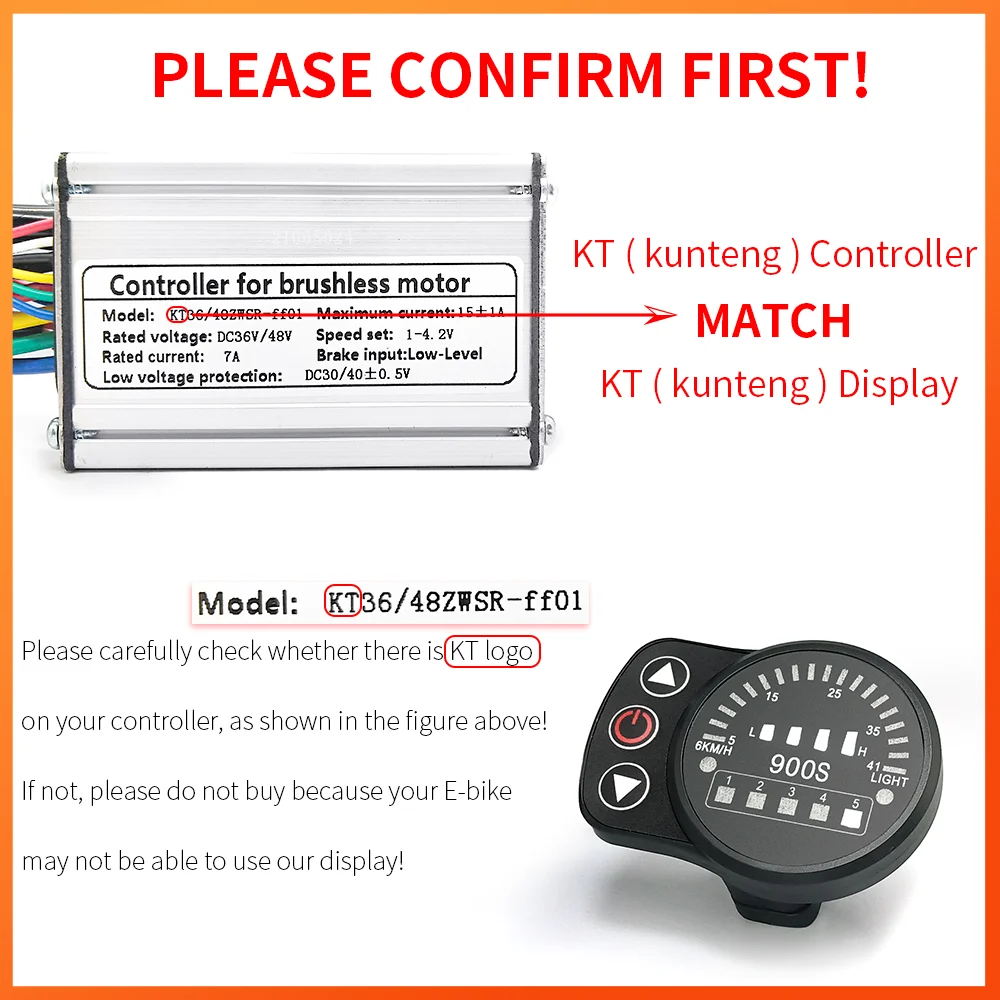
Update Support: Compatible with KT controller firmware tools
The KT LED900S provides reliable performance with straightforward firmware update capability when paired with KT controllers. While simpler than LCD alternatives, it offers solid update support and clear system diagnostics during maintenance procedures.
Programming: Parameter adjustment and firmware update support
Designed for high-voltage systems, the S810 excels in diagnostic capabilities and firmware management. Its wider voltage range suits powerful e-bikes requiring regular monitoring and updates. The detailed error reporting helps diagnose issues before and after firmware changes.
Bafang's flagship display offers seamless firmware updates through smartphone app integration. The color touchscreen provides exceptional user experience for monitoring system status and managing updates. Advanced features like GPS tracking and comprehensive data logging make this ideal for tech-focused riders.
Complete e-bikes with manufacturer-integrated systems offer the most reliable firmware update experience. These bikes receive coordinated updates across all components.
Engwe EP2 Pro Folding E-bike 750W
Motor: 750W rear hub motor with smart controller
Battery: 48V 16Ah with advanced BMS
Display: LCD with Engwe app connectivity
Update System: Mobile app firmware updates for motor, battery, and display
The EP2 Pro demonstrates modern integrated update architecture. Through the Engwe companion app, owners receive notification when updates become available for any system component. The unified update process handles motor controller, BMS, and display firmware simultaneously, ensuring compatibility and reducing user complexity.
Motor: 350W (250W EU version) rear hub with torque sensor
Battery: 36V 13Ah removable battery with smart BMS
Display: Integrated LCD with full system diagnostics
Firmware: App-managed updates with version control
The T14 offers EU-compliant firmware options alongside higher-powered versions, demonstrating how modern e-bikes handle regional software variations. Updates maintain compliance while adding features like improved range algorithms and refined torque sensor response. The torque sensor particularly benefits from firmware refinements that smooth power delivery.
Battery: 52V 40Ah with sophisticated multi-cell BMS
Display: Advanced color display with real-time diagnostics
Updates: Dealer-assisted updates for high-power system safety
High-power systems like the GT20 Pro require careful firmware management due to increased thermal and electrical demands. Updates for such powerful motors often focus on thermal protection, battery discharge management, and safety systems. While updates require dealer service, this ensures proper handling of critical high-voltage components.
Motor: 250W rear hub motor with smooth power delivery
Battery: 36V 10.4Ah with integrated BMS
Design: Low step-through frame for easy mounting
Updates: Simplified update process via dealer or app
Entry-level e-bikes like the BK5S demonstrate that even budget-friendly models now include firmware update capability. While updates arrive less frequently than premium models, they still deliver meaningful improvements to battery management and motor efficiency. The step-through design paired with reliable update support makes this ideal for commuters prioritizing simplicity.
Special Features: Spoke wrench, bottom bracket tool, pedal wrench
Storage: Compact carrying case with organized compartments
Use for Updates: Access to mounting bolts, connection ports, display removal
While not directly an update tool, this comprehensive kit provides everything needed to access update ports, remove displays for cable connections, or troubleshoot physical connection issues during firmware updates. The variety of tools helps when you need to expose hidden diagnostic ports or secure loose connections.
Portability: Lightweight design for seat bag storage
Application: Emergency access to connections during rides
This portable kit serves as backup when firmware issues arise during rides. While you can't perform full updates remotely, having tools to check connections or access diagnostic ports helps troubleshoot unexpected errors. The compact size means you'll actually carry it, unlike larger toolkits.
Understanding how long manufacturers support older models helps set realistic expectations and guides purchasing decisions.
Major brands typically provide firmware updates for 5-7 years after a model's discontinuation. Bosch and Shimano have strong track records of long-term support, releasing security patches and bug fixes even for older motor generations. This commitment reflects their professional market positioning.
Smaller manufacturers and budget brands often provide 2-3 years of updates at best. After this window, you're limited to whatever firmware version was last released. This doesn't necessarily make the bike unusable, but you miss out on improvements and eventual security vulnerabilities go unpatched.
When buying used e-bikes, research when that model was released and when the manufacturer stopped production. A 2018 model from a manufacturer that abandoned updates in 2021 is stuck with 2021 firmware forever. If buying used, prioritize recent models from manufacturers with proven support histories.
DIY and open-source e-bike projects offer perpetual update capability but require technical skills. Platforms like VESC-based motor controllers and open-source BMSs receive community-driven updates indefinitely. However, you're responsible for research, testing, and troubleshooting—not suitable for most riders.
Future of E-Bike Firmware
Firmware technology continues advancing rapidly. Understanding emerging trends helps anticipate what your next e-bike might offer.
Over-the-air (OTA) updates are becoming standard on premium e-bikes. Similar to Tesla vehicles, these bikes download and install updates automatically via cellular or WiFi connections. You wake up to improved performance without visiting dealers or running update apps. This convenience comes with dependencies on network infrastructure and raises questions about forced obsolescence through required updates.
Machine learning integration is arriving in high-end systems. Firmware that analyzes your riding patterns and automatically adjusts motor characteristics, battery management, and assist curves to optimize for your specific usage. Early implementations show 5-10% range improvements through personalized optimization impossible with static firmware.
Cybersecurity concerns grow as connectivity increases. More sophisticated firmware includes encrypted communication protocols, secure boot verification, and remote disable capabilities for theft prevention. Unfortunately, this complexity also creates new attack surfaces that require vigilant update management.
Modular firmware architectures separate motor control from battery management and user interface layers. This separation allows updating individual components without affecting others, reducing update risks and enabling partial updates when only specific functionality needs improvement.
📥 Free Download: E-Bike Firmware Update Checklist
Get our comprehensive printable checklist covering pre-update preparation, step-by-step procedures, troubleshooting guides, and maintenance scheduling for optimal firmware management.
Documentation saves time during future updates and proves invaluable when troubleshooting or selling your e-bike.
Create a simple log recording each firmware update: date installed, firmware version numbers for each component, reason for update, any issues encountered, and post-update notes about performance changes. This historical record helps identify patterns if problems develop later.
Store manufacturer correspondence about updates, especially if a dealer performed the service. Receipts and service records demonstrate proper maintenance to future buyers and may be required for warranty claims related to firmware issues.
Back up configuration settings periodically, not just before updates. Many modern displays allow exporting settings to companion apps. Regular backups protect against unexpected resets from component failures, not just planned updates.
Screenshot or photograph system information screens showing firmware versions, total mileage, battery health statistics, and error logs. These snapshots provide valuable baseline data for future comparison and troubleshooting. If unusual motor noises develop after an update, having pre-update baseline data helps determine whether the update caused the issue.
Related Maintenance Tasks
Firmware updates work best as part of comprehensive e-bike maintenance. Several related tasks deserve attention during or around update schedules.
When updating firmware, also inspect electrical connections. Dirty or corroded contacts in diagnostic ports can cause update failures. Use electrical contact cleaner on connectors before attempting updates, especially on bikes exposed to wet conditions. For comprehensive guidance on diagnosing and fixing connection problems, see our guide on electrical connection issues.
Battery health affects update reliability and new firmware performance. Degraded batteries may not hold charge high enough to complete updates safely. If your battery shows significant capacity loss, consider replacement before major firmware updates. Our guide on battery care covers assessment and maintenance.
Cable routing and connection security prevent update interruptions. Before updates, verify all cables seat firmly in connectors. Loose motor or display cables cause communication failures during firmware flashes.
Sensor calibration often follows firmware updates. Many updates require recalibrating torque sensors, speed sensors, or brake switches. The update process usually prompts for calibration, but verify proper sensor operation afterward. If throttle response seems off after updating, recalibration likely helps.
Community Resources and Support
E-bike communities provide valuable information beyond official manufacturer resources. However, approach community advice cautiously, especially regarding unofficial firmware modifications.
Manufacturer forums and user groups often share detailed update experiences, compatibility information, and troubleshooting for specific models. These communities identify update issues faster than official channels and provide real-world performance feedback.
YouTube tutorials demonstrate update procedures for popular systems, showing physical connection locations and walking through software interfaces. Visual guides complement written instructions and help identify your specific hardware variants.
Third-party diagnostic apps and tools exist for some systems, particularly Bafang motors. While useful for advanced users, unofficial tools risk warranty voids and potential component damage if used incorrectly. Stick to manufacturer-approved update methods unless you're prepared to accept risks.
Reddit communities like r/ebikes discuss firmware experiences across brands, helping identify which updates deliver meaningful improvements versus those causing problems. This collective knowledge helps you make informed decisions about optional updates.
Disclaimer: This guide provides general information about e-bike firmware updates and is not intended as a substitute for professional advice or manufacturer-specific instructions. Always follow your e-bike manufacturer's official update procedures and safety guidelines. Improper firmware updates can damage electrical components and create safety hazards. For complex systems or when uncertain, consult qualified e-bike technicians or authorized dealers. Unofficial firmware modifications void warranties and may violate local regulations. The information provided reflects general practices across multiple manufacturers and systems; always verify compatibility and procedures for your specific e-bike model before attempting updates.
Conclusion
Firmware updates represent one of the least understood yet most impactful aspects of e-bike ownership. That small software package running on your motor controller affects everything from daily ride quality to long-term component longevity. While mechanical maintenance receives deserved attention, firmware maintenance deserves equal consideration.
The best approach combines proactive scheduling with responsive updating. Check for updates every 6-12 months during routine maintenance, but also watch for manufacturer notices about critical updates that need immediate attention. Treat firmware as another component requiring regular service, like brake bleeding or wheel truing.
The evolution toward app-based updates and over-the-air installations makes firmware maintenance increasingly accessible. What once required dealer visits now happens at home in minutes. This democratization benefits all riders through better-performing, safer, and more capable e-bikes.
As e-bikes become more sophisticated, firmware importance will only grow. Riders who maintain their software alongside their hardware maximize performance, extend component life, and enjoy continuously improving experiences. Your e-bike already has untapped potential waiting in the next firmware update—don't let it sit there unused.
Ready to optimize your e-bike? Check your current firmware versions, visit your manufacturer's website, and see what improvements are waiting for you. That ten-minute update might transform your daily commute.
Val is an e-bike specialist with over 10 years of experience riding, maintaining, and testing electric bicycles. At Glide Ebike, Val creates maintenance guides and content based on a decade of hands-on work with e-bike systems, having personally serviced and ridden dozens of different models.
With over 25,000 miles logged across various terrains and conditions, Val's recommendations come from real-world experience with what works—and what doesn't—in everyday e-bike ownership.